Intro-to-DOM
Introduction To DOM#
DOM stands for Document Object Model. This model is a tree like hierarchical representation of HTML or XML element structures providing a way to access each element in the document. This programming interface is a representation of the page so that you can write scripts that can manipulate and change the styles, content and even structure of the page. The document is presented as objects and nodes that make it easier for scripting languages to connect to them.
Almost any time a website performs an action, such as rotating between a slideshow of images, displaying an error when a user attempts to submit an incomplete form, or toggling a navigation menu, it is the result of JavaScript accessing and manipulating the DOM.
What is the DOM#
At the most basic level, a website consists of an HTML document. The browser that you use to view the website is a program that interprets HTML and CSS and renders the style, content, and structure into the page that you see.
In addition to parsing the style and structure of the HTML and CSS, the browser creates a representation of the document known as the Document Object Model.
Why called as Object Model#
Documents are modeled using objects, and the model includes not only the structure of a document but also the behavior of a document and the objects of which it is composed of like tag elements with attributes in HTML.
This model allows JavaScript to access the text content and elements of the website document as objects.
Lets Understand The DOM From Practical Side#
What happened in the browser behind the scenes#
1- The browser receive the html page like this#
2- Based on this source code the browser "draw" a tree of objects (DOM)#
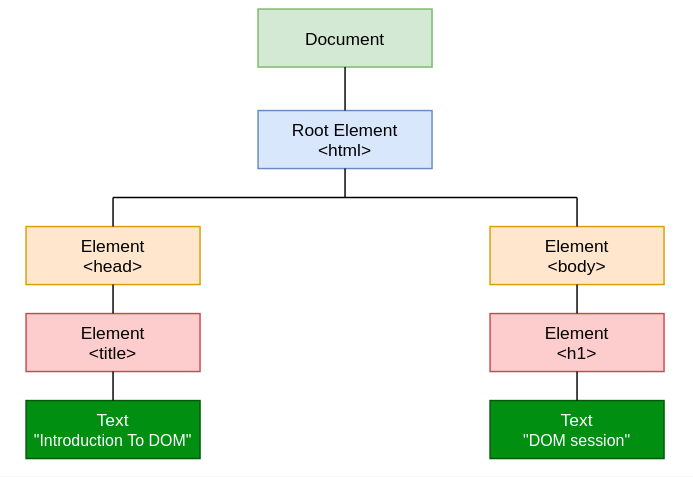
JavaScript can deal with this because it is a tree of objects
3- Then the page will render like this in the browser#
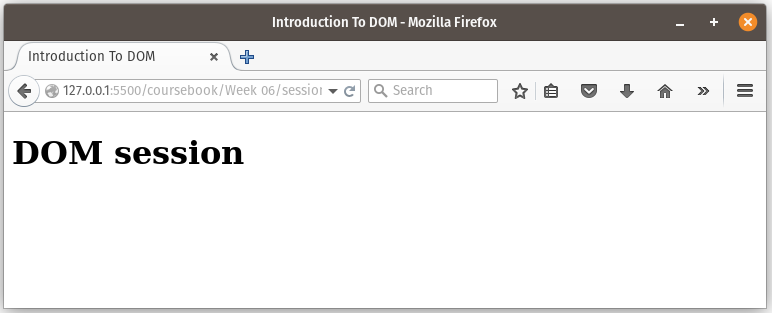
Currently, with this example, it seems that HTML source code and the DOM are the exact same thing.
There are two instances in which the browser-generated DOM will be different than HTML source code:
1- The DOM is modified by client-side JavaScript
2- The browser automatically fixes errors in the source code
let take an example on the second case (we will see later examples on the first one)
We have this html code
There are mistakes in your HTML and the browser has fixed them for you. you leave out the required <tbody> element. The browser will just insert that <tbody> for you. It will be there in the DOM, so you’ll be able to find it with JavaScript and style it with CSS, even though it’s not in your HTML.
If we make inspect on this page in the browser (ctrl+shift+I) we will see that:
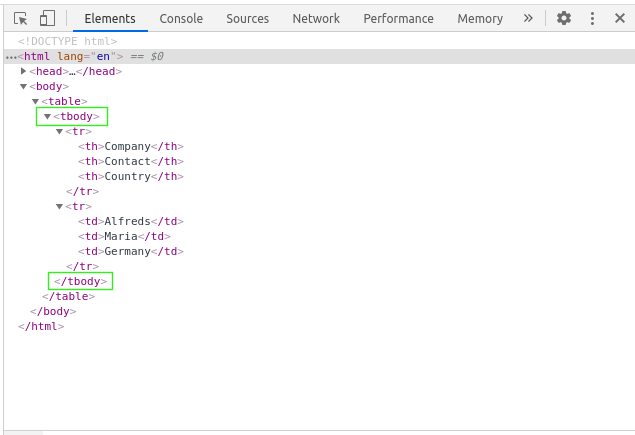
All of the properties, methods, and events available for manipulating and creating web pages are organized into objects (for example, the document object that represents the document itself, the table object that implements the special HTMLTableElement DOM interface for accessing HTML tables, and so on).
Characteristic of DOM#
now we will talk about some dom objects and its methods and properties, In general, methods represent actions and properties represent data.

1- Window Object: Window Object is at always at top of hierarchy it also has other objects not only the document.
2- Document Object: When HTML document is loaded into a window, it becomes a document object.
3- Form Object: It is represented by form tags.
4- Link Objects: It is represented by link tags.
5- Anchor Objects: It is represented by a a tags.
6- Form Control Elements: Form can have many control elements such as text fields, buttons, radio buttons, and checkboxes, etc.
The Window object#

The window object represents the window that contains the DOM document.
window.document points to the document object loaded in the window.
Properties and methods of this object can be called without referencing window explicitly, because it represents the global object. So, the previous property window.document is usually called just document.
For example if we write this in our console, the results are the same

Window Properties#
Here is a list of useful properties you will likely reference a lot:
- console : points to the
browser debugging console. Useful to print error messages or logging, usingconsole.log,console.errorand other tools. - document : as already said, points to the
documentobject, key to the DOM interactions you will perform. - history : gives access to the
History API. - location : gives access to the
Location interface, from which you can determine the URL, the protocol, the hash and other useful information. - localStorage : is a reference to the Web Storage API
localStorageobject. - sessionStorage : is a reference to the Web Storage API
sessionStorageobject.
Window Methods#
The window object also exposes useful methods:
- alert(): which you can use to
display alert dialogs. - focus(): Sets
focuson the current window. - blur() : Sets
focus awayfrom the window. - confirm(): Displays a dialog
with a messagethat the user needs to respond to. - print(): Opens the
print dialogto print the current document. - prompt(): Returns the
text enteredby the user in a prompt dialog. - scroll():
Scrollsthe window to a particular place in the document. - close():
Closesthe current window.
The Document object#
The Document object has a ton of properties and methods. There are some methods that you’ll likely use the most, especially Selectors API methods :
- write(“string”): writes the given string on the document. (Why is document.write considered a “bad practice”?)
- writeln(“string”): identical to the document.write() method with the addition of writing a newline character after each statement.
- querySelector(): returns a single element, the first found.
- querySelectorAll(): returns all the elements, wrapped in a NodeList object.
- getElementById(id): returns the element having the given id value.
- getElementsByName(name): returns all the elements having the given name value.
- getElementsByTagName(tag_name): returns all the elements having the given tag name.
- getElementsByClassName(class_name): returns all the elements having the given class name.
Example#
The standard DOM specifies that the getElementsByTagName method in the code below must return a list of all the <p> elements in the document:
DOM and JavaScript#
In the first example above, like nearly all of the examples in this session, is JavaScript. That is to say, it's written in JavaScript, but it uses the DOM to access the document and its elements. The DOM is not a programming language, but without it, the JavaScript language wouldn't have any model or notion of web pages, HTML documents, XML documents, and their component parts (e.g. elements). Every element in a document—the document as a whole, the head, tables within the document, table headers, text within the table cells—is part of the document object model for that document, so they can all be accessed and manipulated using the DOM and a scripting language like JavaScript.
In the beginning, JavaScript and the DOM were tightly intertwined, but eventually, they evolved into separate entities. The page content is stored in the DOM and may be accessed and manipulated via JavaScript, so that we may write this approximation equation:
API = DOM + JavaScript
Accessing the DOM#
You don't have to do anything special to begin using the DOM. Different browsers have different implementations of the DOM, but every web browser uses some document object model to make web pages accessible via JavaScript.
When you create a script–whether it's inline in a <script> element or included in the web page by means of a script loading instruction you can immediately begin using the API for the document or window elements to manipulate the document itself or to get at the children of that document, which are the various elements in the web page.
Your DOM programming may be something as simple as the following, which displays an alert message by using the alert() function from the window object, or it may use more sophisticated DOM methods to actually create new content, as in the longer example below.
This following JavaScript will display an alert when the document is loaded (and when the whole DOM is available for use):
Example 1#
Example 2#
This function creates a new H1 element, adds text to that element, and then adds the H1 to the tree for this document:
common APIs#
The following is a brief list of common APIs in web and XML page scripting using the DOM.
- document.getElementById(id)
- document.getElementsByTagName(name)
- document.createElement(name)
- parentNode.appendChild(node)
- element.innerHTML
- htmlElement.innerText
- Node.textContent
- element.style.[color]
- element.setAttribute()
- element.getAttribute()
- element.addEventListener()
- window.content
- window.onload
- window.scrollTo()
💡 you should differentiate between these three methods :Javascript innerHTML, innerText, and textContent